Keyword Research for Small Business That Actually Works

Most small business owners chase high-volume keywords and end up ranking for nothing. This guide is for US small business owners who want a practical keyword research process that connects them to customers who are already searching for what they offer. The steps below show you exactly how to find those terms and what to do with them.
Quick Answer: To do keyword research for small business, focus on search intent over volume, target long-tail phrases with three or more words, use Google Autocomplete and People Also Ask for free research, and assign one keyword to one page. Start with commercial and local terms before moving to broad ones.
Why Chasing High-Volume Keywords Is Costing You Rankings
Here is what most small business owners do: they open a keyword tool, find the biggest number, and write a post targeting that term. Then they wait. Nothing happens.
The problem is not the content. It is the keyword selection. A term like "web design" pulls 50,000 searches a month. It also pulls competition from global agencies, software platforms, and media publications that have been building domain authority for a decade. A small business targeting that phrase is not competing. It is disappearing.
Volume tells you how many people search a term. It tells you nothing about whether those people are in your city, ready to buy, or even looking for a business like yours. That is the piece most guides skip, and it is the reason keyword research for small business works differently than it does for large brands.
Why Is Search Intent More Important Than Search Volume?
Search intent is the reason behind a query. Someone typing "what is SEO" wants an explanation. Someone typing "SEO agency for small business near me" wants to hire someone. Same topic, completely different intent, and completely different content needs.
Google has gotten very good at reading intent. It matches search queries with content that fits the purpose of the search, not just the words. If your page answers a question when the searcher wants to buy, Google will not rank it well even if your keyword placement is perfect.
There are four types of search intent worth knowing: informational (learning something), navigational (finding a specific site), commercial (researching before buying), and transactional (ready to act). For small businesses, commercial and transactional keywords are where the leads come from. Informational keywords build the trust that gets people there.
A practical rule: before targeting any search term, ask what the person searching it is trying to do. If your page matches that purpose, you have a shot at ranking. If it does not, no amount of optimization will fix the mismatch.
How to Find Long-Tail Keywords Your Customers Are Actually Typing
Long-tail keywords are phrases of three words or more that target a specific topic, location, or buyer situation. They have lower search volume than broad terms, which is exactly what makes them valuable for small businesses.
"Web design Austin" with 300 monthly searches and clear local buying intent will generate more qualified leads than "web design" with 50,000 searches and no geographic or commercial specificity. The person searching "web design Austin" knows what they want and where they want it. You are not competing with the whole internet. You are competing with a handful of local businesses.
Here is how to find them:
Start with your service and location. Take what you do, add your city or region, and see what Google suggests. Type "affordable [your service] in [your city]" into Google and watch the autocomplete fill in phrases your customers are already using. Every suggestion is a real search query.
Use the People Also Ask section. Every Google results page shows a set of questions people ask around your topic. These are real queries pulled from real searches. Each one is a potential blog post, FAQ answer, or service page section. Mine them every time you research a search phrase.
Check the bottom of the page. Google's related searches section at the bottom of results shows you what people search after they search your term. These variations often reveal intent signals and topic angles you would not have thought of on your own.

How to Use Google Search Console for Keyword Research for Small Business
Most small business owners have Google Search Console set up and never look at it. According to Google, Search Console is the most direct way to understand how your site performs in search, and that makes it one of the most underused tools in small business SEO.
Search Console shows you every search query that brought someone to your site, even if you are ranking on page three. It shows impressions, clicks, and average position. More importantly, it shows you queries where you are getting impressions but no clicks, which means Google is already associating your site with those terms but your page is not compelling enough to get the click.
Those low-click, high-impression queries are your fastest wins. You are already halfway there. Update the page title, sharpen the meta description, and improve the content to better match what the searcher wants. Many clients find that updating two or three existing pages this way produces more ranking improvement than publishing five new ones.
Filter by page to see which of your existing pages are generating search impressions, then look at the queries driving those impressions. Often you will find a page ranking for a search term it was never written to target. That is a signal to either optimize the page for that term or create a dedicated page that covers it properly.
The One Keyword Per Page Rule and Why It Matters
One of the most common mistakes small businesses make is trying to rank one page for multiple unrelated topics. It rarely works, and it usually makes the content worse.
Every page on your site should have one primary keyword it is built around. That phrase should appear in the page title, the first paragraph, at least one subheading, and the conclusion. Every other term on the page should be a semantic variation or related phrase that supports the primary topic, not a separate topic trying to share the same real estate.
When you try to rank a single page for "SEO services," "content marketing," and "social media management" at the same time, Google does not know which topic the page is most relevant for. The result is that it ranks poorly for all three instead of strongly for one.
The practical approach: build a content map. List every service or topic you want to rank for. Assign one primary search phrase to one page or post. If a topic is broad enough to need multiple angles covered, build separate pages for each angle and link them together. That is the foundation of a content strategy for small business that compounds over time.
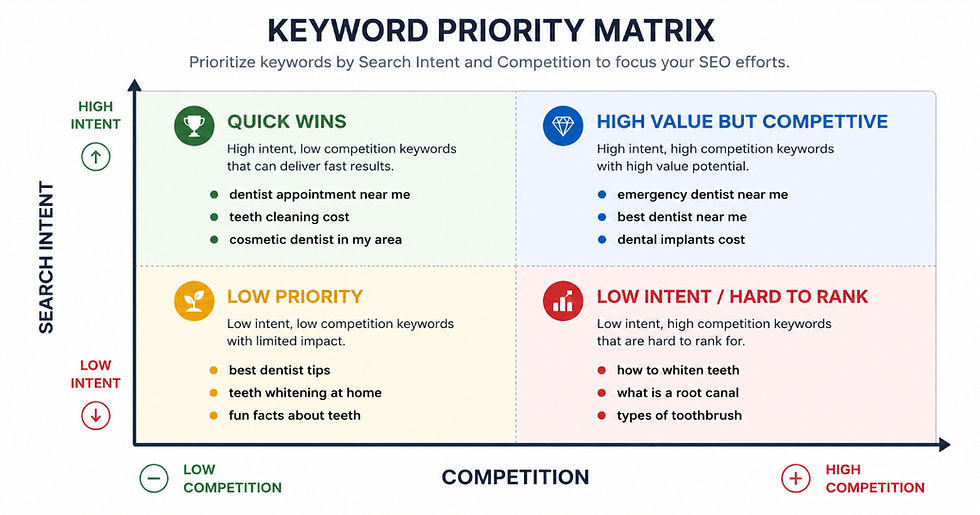
How Do You Prioritize Which Keywords to Target First?
You will end up with more ideas than you can act on immediately. Prioritization is what separates businesses that make steady progress from ones that publish randomly and wonder why nothing ranks.
Score each search phrase across three factors: relevance (does this match exactly what you offer), intent (is the person searching this likely to become a customer), and competition (are the sites currently ranking ones you can realistically compete with).
New sites or sites with low domain authority should start with long-tail, low-competition phrases and build from there. Trying to rank for a competitive short-tail term on a brand new site is a slow path to frustration. Win the specific terms first, build authority, then move toward the broader ones.
Search volume matters, but it is the last factor to consider, not the first. A phrase with 150 monthly searches that is highly relevant, commercial in intent, and low in competition will produce better results for a small business than one with 5,000 monthly searches where every result on page one is a national brand.
A Simple Keyword Research Workflow You Can Start Today
You do not need an expensive tool to start. Here is a repeatable process that works with free resources:
1. List your services and the problems they solve. Write out every service you offer and the specific pain points each one addresses. These become your seed topics.
2. Expand with Google. Use autocomplete, People Also Ask, and related searches to build a list of real phrases around each seed topic. For volume estimates, Google Keyword Planner gives you free data once your seed list is ready.
3. Pull your Search Console data. Check which queries are already driving impressions and identify your fastest-win opportunities before writing anything new.
4. Assign one primary phrase per page. Map each term to an existing page or flag it as a new page to create. Do not let two pages target the same phrase.
5. Prioritize by intent and competition. Start with commercial and transactional phrases that are specific to your location or niche. Build your way toward broader terms as your authority grows.
If you want a deeper look at how to structure content around your search terms once you have them, the blog post ranking guide on AIPro.ph walks through the full process from research to publish.
Start Ranking for Keywords That Actually Bring in Business
Keyword research for small business is not about finding the biggest numbers. It is about finding the right match between what your customers are searching and what your business actually offers.
AIPro.ph is a digital marketing agency helping US small business owners grow organic traffic through AI-assisted SEO and content strategy. We handle keyword research, content creation, and optimization so you can focus on running your business.
Book a free consultation and let us show you exactly which search terms your business should be targeting right now.
Frequently Asked Questions
How many keywords should a small business target?
Start with one primary keyword per page and build from there. A small business with 10 service or location pages should have 10 clearly defined primary keywords, one per page. As you add blog content, each post adds one more. The goal is a focused keyword map, not a long list of terms crammed onto a few pages.
Do I need a paid keyword tool to do keyword research?
No. Google Search Console, Google Autocomplete, People Also Ask, and related searches at the bottom of Google results give you enough data to build a solid strategy. Paid tools like Semrush or Ahrefs add volume data and competitor insights, but they are not required to get started and see results.
How long does it take for keyword research to show results?
The research itself is immediate. The results from the content built around those terms typically take three to six months to appear in rankings. The businesses that see consistent growth are the ones that build content systematically over time rather than publishing in bursts.
Should I target keywords with my city name in them?
Yes, if you serve a specific area. Local phrases like "digital marketing agency Houston" or "SEO services for small business in Chicago" attract searchers with strong local intent. These are often less competitive than national terms and convert at a higher rate because the searcher is looking for a business in their area.
What is the difference between a keyword and a search phrase?
In practice, they are often used interchangeably. A keyword can be a single word like "SEO," but most effective SEO targeting today focuses on phrases of two to five words. The shift toward longer, more specific phrases reflects how people actually search, especially on mobile and voice search where queries tend to be more conversational.
Key Takeaways
High search volume does not mean high value for small businesses. Intent, relevance, and competition matter more than the number.
Long-tail phrases with three or more words are where small businesses win. They are specific, lower in competition, and attract buyers closer to a decision.
Google Search Console shows you queries you are already getting impressions for. These are your fastest optimization opportunities.
One primary keyword per page is the rule. Trying to rank one page for multiple unrelated topics splits your relevance signal and reduces rankings for all of them.
People Also Ask and Google Autocomplete are free research tools that show you exactly what your customers are typing right now.
Prioritize by intent and competition first, volume second. Win the specific terms, build authority, then move toward the broader ones


Comments