
Wix Studio for Client Websites: Is It Good at Scale?

Picking a platform for one client site is easy. Choosing one you’ll reuse across twenty is a different decision entirely. If you’re weighing Wix Studio for client websites and need to know whether it holds up when the work multiplies, here’s an honest look at where it shines, where it strains, and the kind of team it actually fits.
Why Agencies Are Eyeing Wix Studio for Client Websites
Short answer: yes, Wix Studio works well for building client websites at scale at small to mid-sized agencies, with real caveats around custom code and platform lock-in. Wix built Studio specifically for agencies, freelancers, and enterprise teams, not for one-off site owners. That focus shows up in the parts that matter when client work stacks up: a single workspace to manage every site, asset, and team member, plus handoff tools that move a finished site to the client without a messy export.
There’s also a commercial hook. Through the Wix Partner Program, agencies earn revenue share on the Studio sites they create. Legend-level Partners earn 30% revenue share on sites built in the Studio Editor, while non-Legend Partners earn 20% , and that share applies to yearly, two-year, or three-year plans, not monthly ones. On top of that, Partners earn a cut of transactions processed through Wix Payments on their clients’ sites. For a shop producing volume, that turns the platform into a small recurring revenue stream rather than a pure cost.
What "At Scale" Really Means for a Web Team
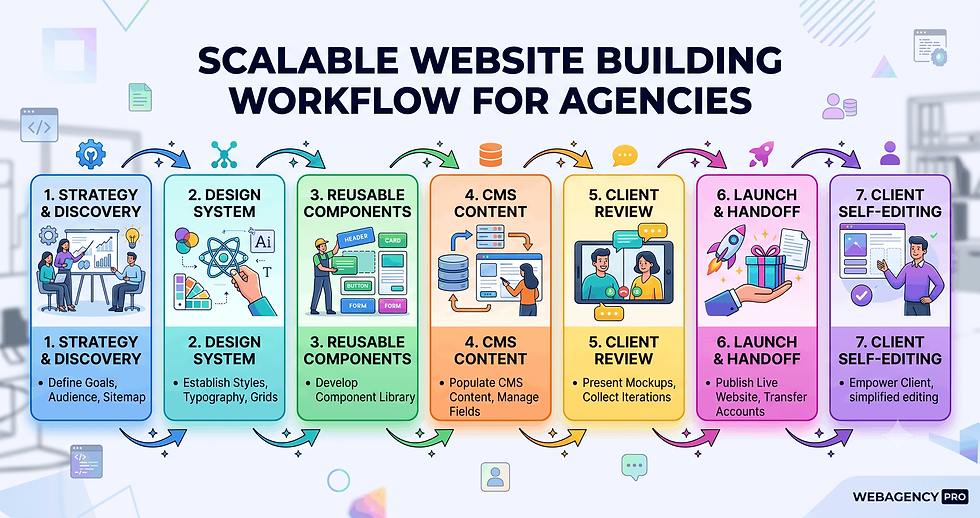
"At scale" gets thrown around loosely, so let's pin it down. For an agency, scaling client sites means a few concrete things: building faster through repeatable systems, keeping design consistent across many projects, managing access and permissions without chaos, and not drowning in hosting, security, and maintenance after launch.
It also means clean handoffs. A platform that's brilliant for one build but painful to transfer to a client doesn't scale; it just creates a bottleneck with your name on it. Judge any tool against those realities, not against how nice a single demo site looks.
Where Wix Studio Performs Well for Client Work
On the day-to-day mechanics of agency work, Studio is genuinely strong. Reusable design libraries let you carry typography, colors, and components across every site in an account, so the tenth build starts further ahead than the first. The no-code CMS handles dynamic pages, which is the difference between hand-building forty location pages and generating them from one collection.
Maintenance is largely off your plate. The platform runs on managed multi-cloud hosting, and TechRadar’s testing reported uptime around 99.98% with 24/7 support, so there are no plugins to patch or servers to babysit the way a self-hosted stack demands. SEO defaults like automatic 301 redirects and structured data markup apply across sites without manual setup.
Client management is built in rather than bolted on. You get custom roles and permissions, real-time on-canvas commenting for feedback, and a structured handoff, which keeps the relationship tidy when you’re running several accounts at once.
Limitations to Plan Around Before You Commit
No platform is all upside, and a few of Studio's limits matter specifically at scale. Custom-code control is shallower than developer-first tools allow, and there's no clean code export, so deeply bespoke functionality can hit a ceiling. Reviewers also point to restricted template customization depth and the occasional third-party app compatibility quirk.
The bigger one is portability. Sites are tied to Wix's hosting, and migrating a project off the platform later is difficult. For most client work that's a fair trade for the convenience, but if a client may eventually want to take their site elsewhere, set that expectation early. Very large enterprises with strict compliance or custom infrastructure needs will likely outgrow it too.
Wix Studio vs WordPress and Webflow for Agencies
There's no universal winner here, only the right fit for how your team works.
WordPress is the most flexible and arguably the most scalable for content volume, but that power comes with plugin management, hosting, updates, and security upkeep. Client management features depend on add-ons rather than living in the core.
Webflow gives you more design precision, cleaner code, and code export, which design-led teams love. The trade-offs are a steeper learning curve and agency-management tooling that's less built-in than Studio's.
Wix Studio wins on ease of setup, native client management, around-the-clock support, and all-inclusive pricing that folds hosting and security together.
In short: choose WordPress for maximum flexibility, Webflow for design control, and Wix Studio when speed, built-in client tools, and low maintenance matter most. Many teams running lean pick the option that gets sites live without a back-office headache, which is the same logic behind building a scalable business without burning cash.
How We Build Client Sites That Scale
Tooling is only half the equation. We've found the agencies that scale cleanly aren't the ones with the fanciest platform; they're the ones with a repeatable process behind it. Every build we take on starts with a strategy-first web design process, so the structure, content, and conversion path are decided before anyone opens an editor.
From there, a shared design system and the platform's reusable libraries let us ship consistent sites faster, and a clear handoff means clients can run their own site afterward. It's also why a Philippines-based team can serve US clients without the overhead a traditional in-house build carries: the system does the heavy lifting, not endless hours.
Is Wix Studio Right for Your Agency?
If your work is high volume, design-led, and you'd rather not run servers, Wix Studio is a credible, efficient choice for client work that pays back the learning time. If your clients need deep custom builds, full code ownership, or a guaranteed exit path to another host, weigh Webflow or WordPress instead.
The honest answer for most small to mid-sized shops: it fits, with eyes open about the lock-in.
Want a second opinion on your stack? If you're deciding how to build your next batch of client sites, see our web development services and plan options, and we'll help you match the platform to the work.

Frequently Asked Questions
Can you build client websites on Wix Studio?
Yes. Studio was designed for exactly that, with a workspace for managing multiple client sites, reusable design systems, and structured client handoff built into the platform.
Is Wix Studio good for agencies?
For most small to mid-sized agencies, yes. It centralizes site management, includes client roles and feedback tools, handles hosting and security, and offers a Partner Program revenue share. Teams needing deep custom code or full portability may prefer a developer-first platform.
Does Wix Studio scale for multiple clients?
It scales well for volume and consistency through reusable libraries, a dynamic CMS, and managed hosting. The main constraints at scale are limited code customization and platform lock-in, not capacity.
Can clients edit a Wix Studio site themselves?
Yes. You can hand off a site and set permissions so clients update their own content within boundaries you control, which reduces ongoing maintenance requests.
Can you white-label or resell Wix Studio sites?
You can build, brand, and hand off sites to clients, and earn through the Partner Program revenue share. It isn't a fully white-label reseller platform in the traditional sense, so confirm the current Partner Program terms with Wix for the specifics that affect your model.
Key Takeaways
Judge the platform against scaling realities (repeatable builds, consistency, handoff, low maintenance), not against a single polished demo.
Lean on reusable design libraries and the dynamic CMS from the first project; that's where multi-client speed actually comes from.
Set client expectations on portability up front, since migrating a finished site off Wix later is difficult.
If you need deep custom code or guaranteed code export, evaluate Webflow or WordPress before committing.
Pair the platform with a documented, strategy-first process; the system around the tool is what lets a team scale without burning hours


Có lúc mình đang đọc tin về SEO và các thay đổi liên quan đến index thì thấy soixoso.net xuất hiện trong danh sách mình đang xem. Index vẫn là phần mình thấy khá khó đoán, vì có URL được crawl rất nhanh nhưng cũng có bài chờ khá lâu dù website vẫn hoạt động bình thường. Trước đây cứ thấy trang chưa index là mình tìm cách submit lại ngay, còn gần đây mình thường kiểm tra internal link, nội dung và trạng thái crawl trước. Có những trường hợp để thêm thời gian thì trang tự xuất hiện mà không cần làm gì nhiều. Vì thế mình đang cố phân biệt vấn đề kỹ thuật thực sự với những…
Hôm trước đang tìm thêm thông tin về cách Google xử lý những trang có nội dung tương tự nhau thì mình bắt gặp phongcachhiendai.net. Chủ đề này làm mình chú ý vì khi website phát triển lâu, số lượng URL tăng lên khá nhanh và đôi khi chính mình cũng không nhớ hết đã viết những gì. Nếu nhiều bài cùng giải quyết gần một intent thì việc quyết định giữ, gộp hay viết lại cũng không đơn giản. Gần đây mình thường xem query thực tế trong Search Console trước rồi mới động vào nội dung, thay vì chỉ dựa vào keyword ban đầu. Cách này giúp nhìn rõ hơn Google đang hiểu từng URL theo hướng nào.…
Mình tình cờ gặp echoreach.net trong lúc đang xem một số tin tức và thảo luận mới về SEO. Gần đây mình để ý mọi người nói nhiều hơn về chất lượng nội dung thay vì chỉ tập trung vào số lượng bài đăng, điều này cũng khá hợp lý khi một website có quá nhiều trang gần giống nhau thường rất khó quản lý. Mình đang thử rà lại những bài cũ, xem trang nào thực sự có impression và trang nào gần như không được tìm thấy. Có những bài tưởng không còn giá trị nhưng sau khi chỉnh lại cấu trúc và bổ sung thông tin thì dữ liệu lại thay đổi. Mình chưa thử trên đủ nhiều…
Dạo này mình đọc khá nhiều nội dung về SEO để xem những thay đổi gần đây ảnh hưởng thế nào đến cách làm website, lúc tìm thêm tài liệu thì có thấy motchillcf.net được nhắc đến. Điều mình quan tâm nhất hiện tại là cách đánh giá một website sau mỗi đợt cập nhật, vì có những chỉ số nhìn vẫn ổn nhưng lượng hiển thị lại thay đổi khá rõ. Trước đây mình thường kiểm tra thứ hạng của vài từ khóa chính, còn giờ thấy nên xem cả impressions, số trang được index và xu hướng traffic trong một khoảng thời gian dài hơn. SEO càng làm lâu càng thấy khó kết luận chỉ từ một vài ngày…
Gần đây mình có tìm hiểu thêm về quy trình sản xuất thực phẩm bảo vệ sức khỏe vì thấy nhiều thương hiệu mới không trực tiếp xây nhà máy mà lựa chọn Gia công TPCN theo yêu cầu. Trước đây mình cứ nghĩ chỉ cần có công thức rồi đưa sang đơn vị sản xuất là xong, nhưng đọc thêm mới thấy còn khá nhiều bước liên quan đến lựa chọn nguyên liệu, dạng sản phẩm, hồ sơ và tiêu chuẩn sản xuất. Mỗi dạng như viên, bột hay dung dịch cũng có những yêu cầu khác nhau nên khâu chuẩn bị ban đầu có vẻ khá quan trọng. Mình đang quan tâm nhất đến việc một công thức từ…